

Make an AI cinematic car edit of your own car in a dark underground garage, headlights on, from three photos.
3 photos · 12-second vertical (9:16) video with sound · from 36 credits on Economy
No credits are spent until you press Generate · updated November 9, 2026
Underground Garage Car Edit at a glance
Underground Garage Car Edit is a ready-made AI Video template on TalkPix. In the studio it is called Underground Garage. Make an AI cinematic car edit of your own car in a dark underground garage, headlights on, from three photos. You add 3 photos; the template supplies the scene, the camera moves and the sound. The result is a 12-second vertical (9:16) video with sound, made by Seedance 2.5 (Standard); Seedance 2.0 Fast (Economy, eligible clips up to 15 seconds), for 84 credits at 480p, 192 at 720p; 36 credits at 480p, 72 at 720p on the economy tier.
Industrial Yard Car Edit is the same slow detail-shot edit outdoors under a grey daytime sky, and Car Rolling Shots films the car moving at speed. Here the car stays parked indoors at night under strip lights, with no person in frame.
All the details
What happens in the video
Your car stands alone in a dark underground car park at night, under cold strip lights, its headlights on. The film moves slowly around it in short, quiet shots: the whole car head-on, the grille and badge, a headlight up close, the glowing tail lights and the plate, a glide along the side, and a last straight look at the front, to the sound of the engine idling. Add your car from the front, the side and the back, and it keeps its own shape, wheels, lights and plate in every shot.
The Underground Garage video is vertical (9:16), the format TikTok, Instagram Reels and YouTube Shorts use, so the file posts without cropping.
| Scene or format | Underground Garage Car Edit |
|---|---|
| TalkPix template | Underground Garage, an AI Video template on TalkPix |
| You add | 3 photos: Your car from the front, Its side, Its back |
| Result | 12-second vertical (9:16) video with sound |
| Sound | Yes, generated with the video |
| Model | Seedance 2.5 (Standard); Seedance 2.0 Fast (Economy, eligible clips up to 15 seconds) |
| Price | 84 credits at 480p, 192 at 720p; 36 credits at 480p, 72 at 720p on the economy tier |
| Credit value in USD | In dollars: about $3.60 for 12 s at 480p on the economy tier (36 credits at the Mini pack rate), about $6.00 for 12 s at 720p on the economy tier (72 credits at the Starter pack rate), about $7.00 for 12 s at 480p (84 credits at the Starter pack rate) and about $13.71 for 12 s at 720p (192 credits at the Creator pack rate). You buy credits in packs, not per video. Packs start at $5, and larger packs cost less per credit. |
| Opens in | AI Video studio, with the template loaded |
| Example | Real render from October 15, 2026. The sample photos are real photos from a member of the TalkPix team, used with permission. This example was rendered with Seedance 2.5 on Standard. Economy uses Seedance 2.0 Fast; its output can differ from this sample. |
| Page updated | November 9, 2026 |
Before and after
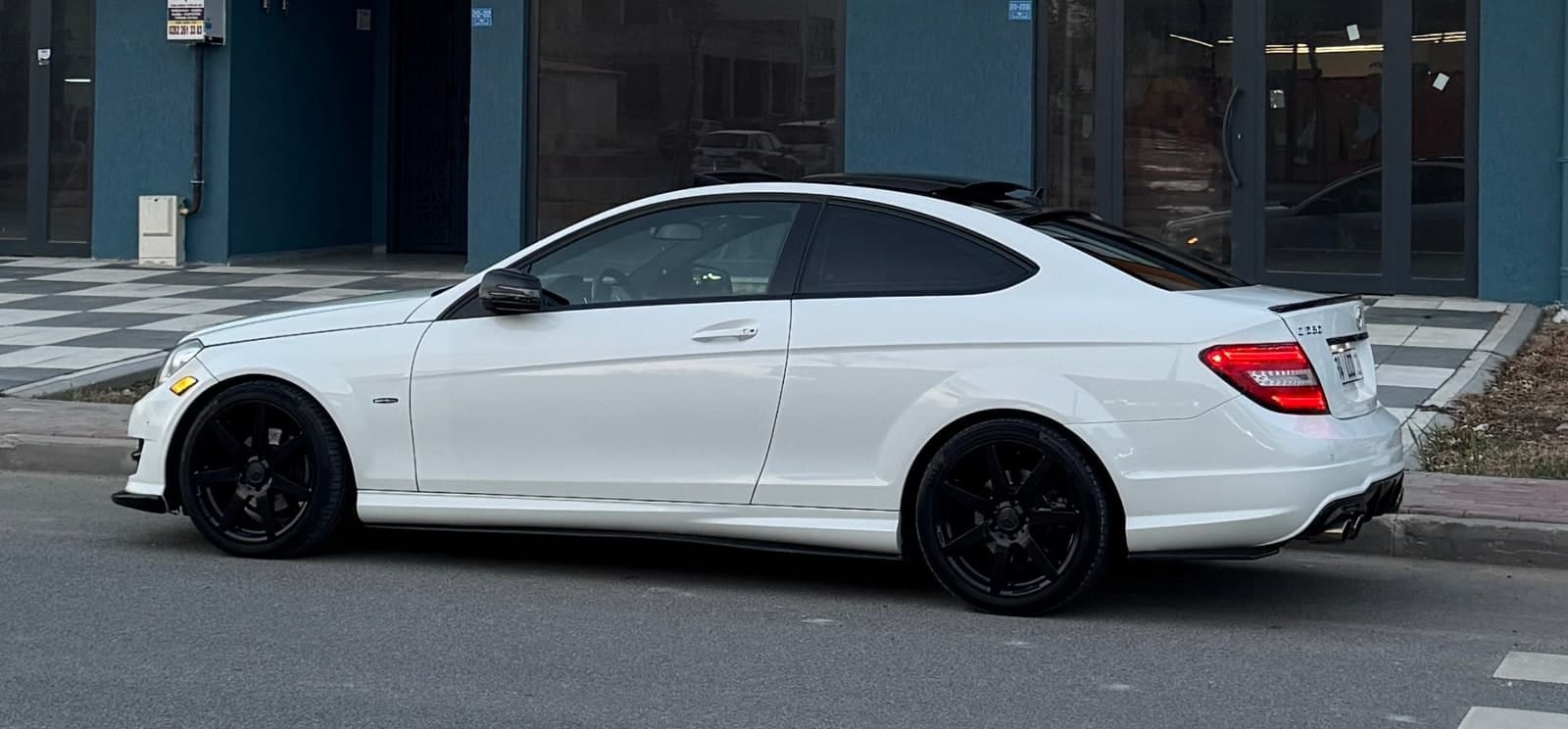
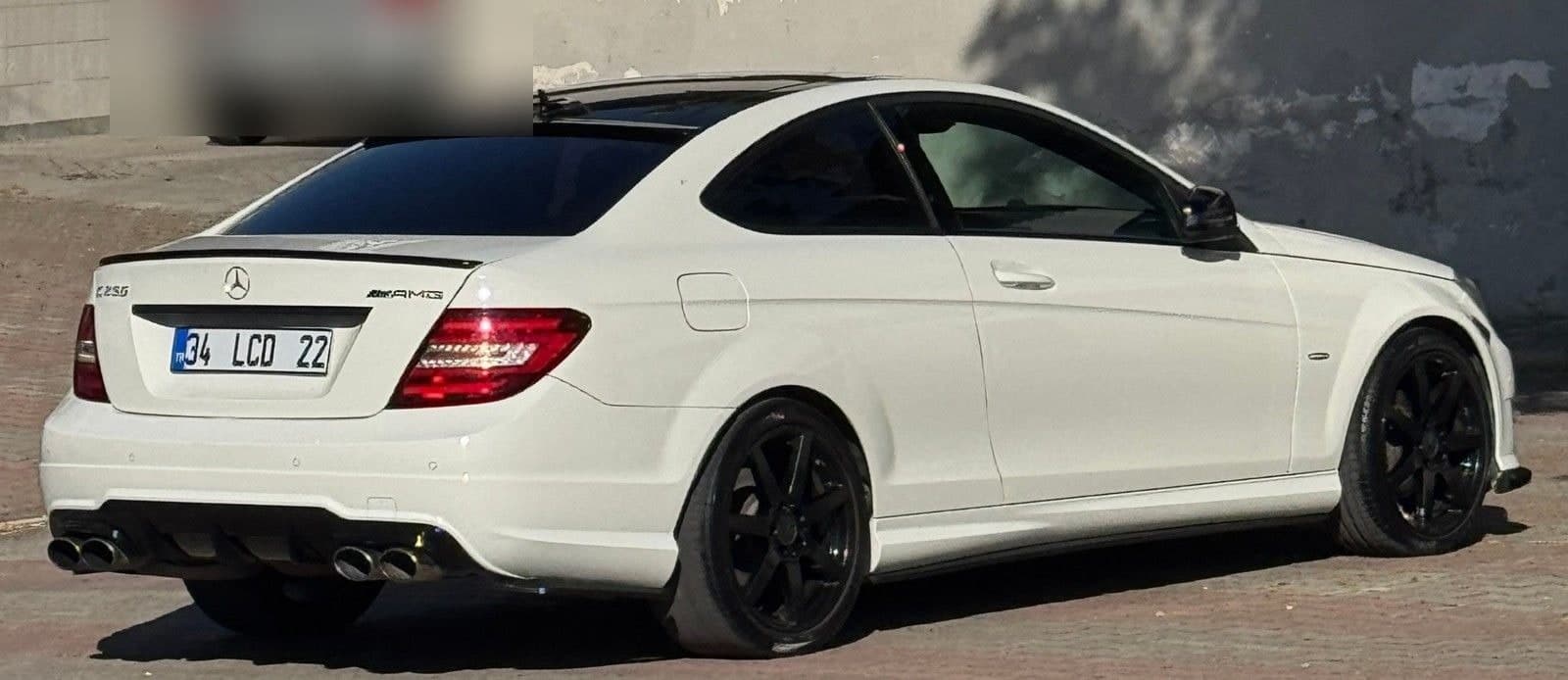
What the Underground Garage example was made from
The example above is a real render of this template from these photos, made on October 15, 2026. The sample photos are real photos from a member of the TalkPix team, used with permission. This example was rendered with Seedance 2.5 on Standard. Economy uses Seedance 2.0 Fast; its output can differ from this sample.

What you need and what you get
- Photos (3 photos)
- Your car from the front — The whole car from the front or front three-quarter, sharp and well lit.
- Its side — The same car from the side: the profile and the wheels.
- Its back — The same car from behind: the tail lights, badges, plate and exhaust tips.
- Result
- 12-second vertical (9:16) video with sound. Made with Seedance 2.5 (Standard); Seedance 2.0 Fast (Economy, eligible clips up to 15 seconds) for the Underground Garage template.
- Price
- Underground Garage costs 84 credits at 480p, 192 at 720p; 36 credits at 480p, 72 at 720p on the economy tier. Credit packs start at $5 with no subscription required, and credits never expire; see pricing.
How do I make an AI cinematic car edit of my car in an underground garage?
Step 1
Open the Underground Garage template
Underground Garage opens in the AI Video studio with its scene, camera and sound already set.
Step 2
Add 3 photos
Upload your car from the front, its side and its back for the Underground Garage template.
Step 3
Generate
Sign in and check the displayed credit estimate (84 credits at 480p, 192 at 720p; 36 credits at 480p, 72 at 720p on the economy tier) before generating. Paid generation needs sufficient credits; buy a pack if needed. A failed render returns its generation credits. Any optional image preparation has its own displayed charge.
Step 4
Download and post
The finished Underground Garage video opens on its result page as an MP4 you download, share by link or run again with another photo.
Underground Garage Car Edit questions
What is the Underground Garage Car Edit trend?
Underground Garage Car Edit is the Underground Garage AI Video template on TalkPix. Make an AI cinematic car edit of your own car in a dark underground garage, headlights on, from three photos. You add 3 photos and the result is a 12-second vertical (9:16) video with sound.
What happens in the Underground Garage video?
Your car stands alone in a dark underground car park at night, under cold strip lights, its headlights on. The film moves slowly around it in short, quiet shots: the whole car head-on, the grille and badge, a headlight up close, the glowing tail lights and the plate, a glide along the side, and a last straight look at the front, to the sound of the engine idling. Add your car from the front, the side and the back, and it keeps its own shape, wheels, lights and plate in every shot.
How do I make an AI cinematic car edit of my car in an underground garage?
Open the Underground Garage template (the Use this template button on this page, or talkpix.ai/create/ai-video?trend=underground-garage), add your car from the front, its side and its back, and press Generate. The Underground Garage video is ready on its result page as a downloadable MP4; you can leave the page while it renders.
How much does the Underground Garage template cost?
The Underground Garage template costs 84 credits at 480p, 192 at 720p; 36 credits at 480p, 72 at 720p on the economy tier. In dollars: about $3.60 for 12 s at 480p on the economy tier (36 credits at the Mini pack rate), about $6.00 for 12 s at 720p on the economy tier (72 credits at the Starter pack rate), about $7.00 for 12 s at 480p (84 credits at the Starter pack rate) and about $13.71 for 12 s at 720p (192 credits at the Creator pack rate). You buy credits in packs, not per video. Packs start at $5, and larger packs cost less per credit. The exact total is on the Generate button before anything renders, and a render that fails returns its credits. Credits never expire.
What photos do I need for Underground Garage?
Underground Garage needs 3 photos. Your car from the front: The whole car from the front or front three-quarter, sharp and well lit. Its side: The same car from the side: the profile and the wheels. Its back: The same car from behind: the tail lights, badges, plate and exhaust tips. Only use photos of yourself or of people who have agreed to it.
Will my Underground Garage result match the example exactly?
No exact match is guaranteed. The example shows one real render, not a promise of identical output. AI can change faces, objects, motion or lettering. Use clear reference photos and review the downloaded result before posting.
How long is the Underground Garage video?
12 seconds, vertical (9:16), generated with sound by Seedance 2.5 (Standard); Seedance 2.0 Fast (Economy, eligible clips up to 15 seconds).
Can I post Underground Garage on TikTok, Instagram Reels or YouTube Shorts?
Yes. The Underground Garage video is vertical (9:16), the format TikTok, Instagram Reels and YouTube Shorts use, so the file posts without cropping. Download the file from the result page and post it from your own account; the result is AI-generated, so label it as such where a platform asks.
Do I need an app to make Underground Garage?
No. Underground Garage is made in the TalkPix web app, which runs in the browser on any phone, tablet or computer with nothing to install. You need a TalkPix account and credits; the exact cost is on the Generate button.
Is the Underground Garage example real?
Yes. It is a real render of this template, made on October 15, 2026 from the sample photos shown on this page. The sample photos are real photos from a member of the TalkPix team, used with permission. This example was rendered with Seedance 2.5 on Standard. Economy uses Seedance 2.0 Fast; its output can differ from this sample.
Can I use my Underground Garage video commercially?
Yes, when you hold the rights and consent for every photo you add and follow the TalkPix Terms and the rules of the platform you post on. Underground Garage renders are AI-generated: only use photos of yourself or of people who have agreed to it.
Car edit
Make a cinematic car edit in an underground parking garage
Which car photos should I add for the garage edit?
Add three photos of the same car: one straight from the front, one from the side and one from the back. Keep the whole car in each frame, sharp and uncropped, so the grille, badge, wheels and lights are easy to read. The tail lights and the plate get their own close shots, so make sure they are clear in the back photo. Leave people out of the photos, because this edit shows the car alone.
What shots are in the underground garage car edit?
The car stays parked and only the camera moves, slowly, under cold strip lights. You get a head-on look at the whole car with the headlights on, a close pass over the grille and badge, a headlight up close, the glowing tail lights and the plate, a glide along the side, and a last straight look at the front. The sound is the engine idling in the empty garage, not a song.
Is this the same as a parking garage car photoshoot?
It has the look of a parking garage car photoshoot, but you do not need to find an empty level at night, park under the right lights or bring a camera. The garage, the strip lighting and the slow detail moves come from the template, and no prompt writing is needed. Want the same calm detail shots outdoors in daylight instead? Try the industrial yard car edit.
Credit packs from $5 · no subscription required
More AI video trends

Car Jump AI Video
AI Video

AI Night Drive Video
AI Video

Liquid Metal Car Assembly
AI Video

Car Kickflip Over Parked Cars
AI Video

Champagne Birthday Car Backflip
AI Video

Car Weather Change Video
AI Video
Same theme, other studios

Car at the Manhattan Bridge
AI Image

AI Toy Car in a Blister Pack
AI Image

Modified Car Dream Build
AI Image
Browse by theme
Make Underground Garage Car Edit with your photo
Underground Garage · AI Video studio · 3 photos · from 36 credits on Economy · 12-second vertical (9:16) video with sound