
AI Toy Car Transition Video: Train Tunnel Reveal
A scale model of your car rides a train's window ledge, the train dives into a tunnel, and your real car drives out of the dark.
3 to 5 photos · 15-second widescreen (16:9) video with sound · from 105 credits
No credits are spent until you press Generate · updated October 26, 2026

Train Tunnel Toy Car Transition at a glance
Train Tunnel Toy Car Transition is a ready-made AI Video template on TalkPix. Its catalogue name is Toy Car Transition. A scale model of your car rides a train's window ledge, the train dives into a tunnel, and your real car drives out of the dark. You add 3 to 5 photos; the template supplies the scene, the camera moves and the sound. The result is a 15-second widescreen (16:9) video with sound, made by Kling 4.0, for 105 credits at 480p, 165 at 720p.
This is the train-window version of the toy car transition: the model rides a moving train's ledge and becomes your real car inside a tunnel. For a toy thrown onto a road choose Pocket Car; for a toy pushed along a rooftop, Toy Car, Real Car.
Every fact as a table
What happens in the video
A perfect scale model of your car sits on the window ledge of a train speeding through a snowy forest, raindrops on the glass and its lights glowing. The train dives into a tunnel, the carriage goes black, and when the light comes back the model is your real car, driving the tunnel with its lights on. Low tracking shots follow it past the tunnel walls, then a close-up of the front wheel and headlight, the door and the mirror, before it drives away down the tunnel, all in 15 seconds, with its own engine under the reel's song.
The Toy Car Transition video is widescreen (16:9), which suits YouTube, X and landscape posts; for Reels or TikTok, crop it to 9:16 in the platform's editor or post it with bars.
| Scene or format | Train Tunnel Toy Car Transition |
|---|---|
| TalkPix template | Toy Car Transition, an AI Video template on TalkPix |
| You add | 3 to 5 photos: From behind at an angle, lights on, From the front, lights on, Its side, A wheel close-up (optional), Its lights up close (optional) |
| Result | 15-second widescreen (16:9) video with sound |
| Sound | Yes, the trend's own soundtrack, laid over the video |
| Model | Kling 4.0 |
| Price | 105 credits at 480p, 165 at 720p |
| Credit value in USD | Consumed credit value: about $8.75 for 15 s at 480p (105 credits at the Starter pack rate) and about $11.79 for 15 s at 720p (165 credits at the Creator pack rate). These are USD list-price equivalents, not separate cash purchases. Credit packs start at $5; larger packs cost less per credit. |
| Opens in | AI Video studio, with the template loaded |
| Example | Real render from October 26, 2026. The sample photos are real photos from a member of the TalkPix team, used with permission. |
| Page updated | October 26, 2026 |
Before and after
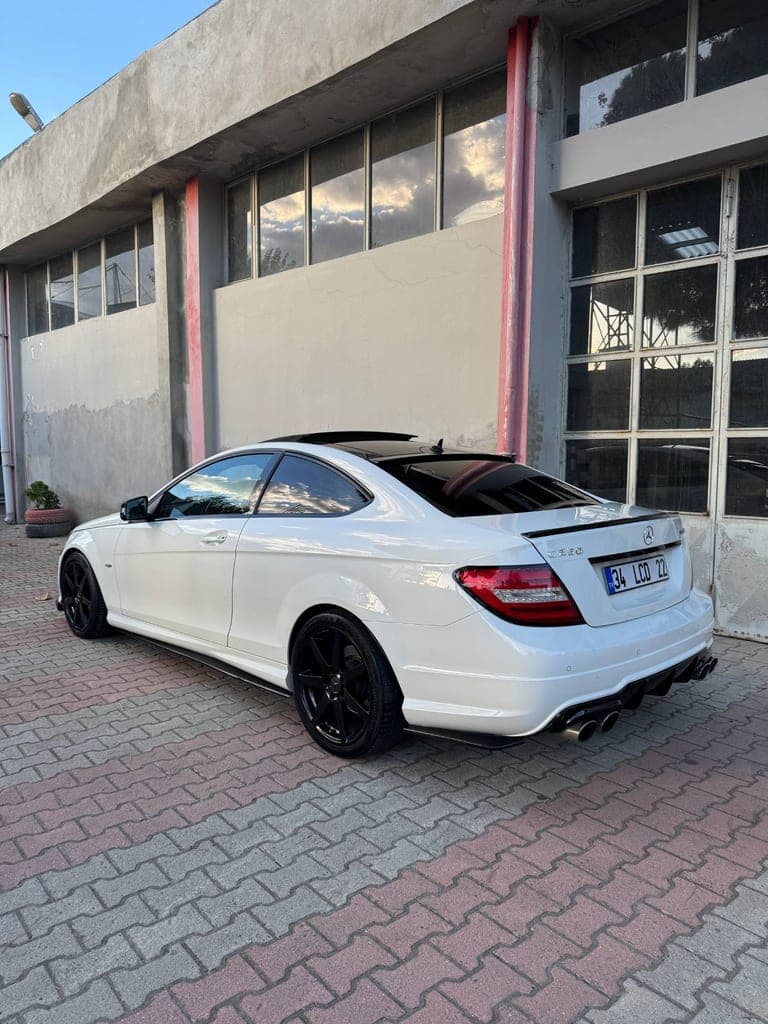
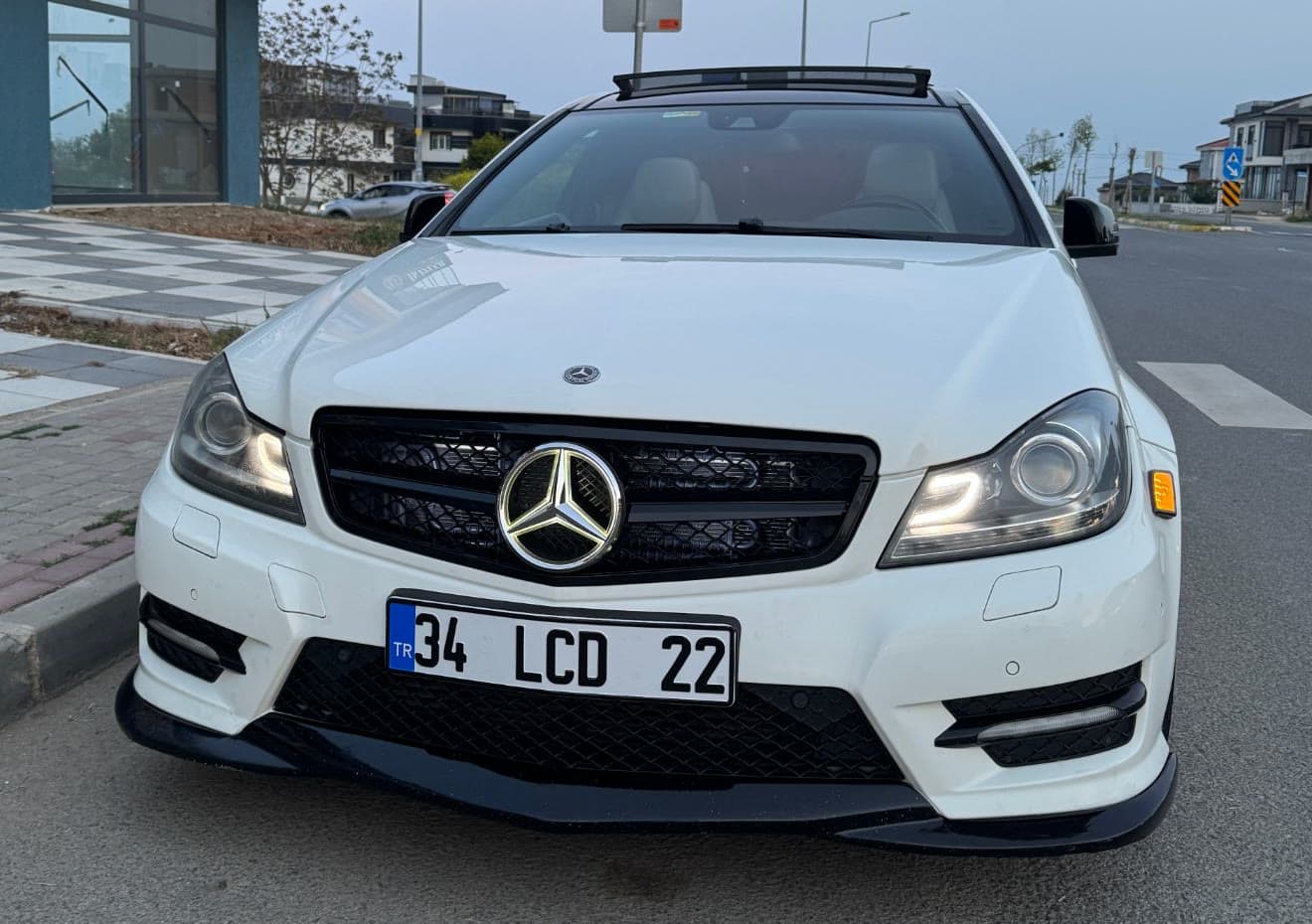
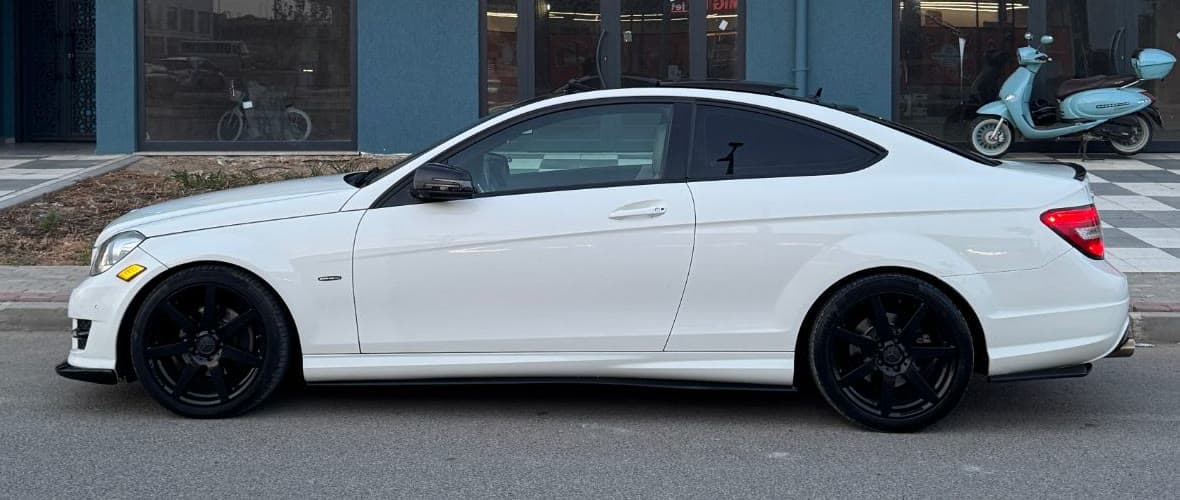
What the Toy Car Transition example was made from
The example above is a real render of this template from these photos, made on October 26, 2026. The sample photos are real photos from a member of the TalkPix team, used with permission.
What you need and what you get
- Photos (3 to 5 photos)
- From behind at an angle, lights on — The whole vehicle from the rear three-quarter, tail lights on. Best with the tail on the left of the photo and the nose pointing away to the right.
- From the front, lights on — Headlights, daytime lights and any marker lights switched on; dusk or night shows them best.
- Its side — The exact side profile with every wheel. A daylight photo shows the true paint colour; add a night one with the lights on as the second photo.
- A wheel close-up (optional) — The front wheel and corner up close: the rim, the brake caliper and any side marker.
- Its lights up close (optional) — Any special lights glowing up close: side markers, LED strips, lights under the wheel arches.
- Result
- 15-second widescreen (16:9) video with sound. Made with Kling 4.0 for the Toy Car Transition template.
- Price
- Toy Car Transition costs 105 credits at 480p, 165 at 720p. Credit packs start at $5 and credits never expire; see pricing.
How do I make the viral toy car transition with my own car?
Step 1
Open the Toy Car Transition template
Toy Car Transition opens in the AI Video studio with its scene, camera and sound already set.
Step 2
Add 3 to 5 photos
Upload from behind at an angle, lights on, from the front, lights on and its side, optionally a wheel close-up and its lights up close for the Toy Car Transition template.
Step 3
Generate
Sign in and check the displayed credit estimate (105 credits at 480p, 165 at 720p) before generating. Paid generation needs sufficient credits; buy a pack if needed. A failed render returns its generation credits. Any optional image preparation has its own displayed charge.
Step 4
Download and post
The finished Toy Car Transition video opens on its result page as an MP4 you download, share by link or run again with another photo.
Train Tunnel Toy Car Transition questions
What is the Train Tunnel Toy Car Transition trend?
Train Tunnel Toy Car Transition is the Toy Car Transition AI Video template on TalkPix. A scale model of your car rides a train's window ledge, the train dives into a tunnel, and your real car drives out of the dark. You add 3 to 5 photos and the result is a 15-second widescreen (16:9) video with sound.
What happens in the Toy Car Transition video?
A perfect scale model of your car sits on the window ledge of a train speeding through a snowy forest, raindrops on the glass and its lights glowing. The train dives into a tunnel, the carriage goes black, and when the light comes back the model is your real car, driving the tunnel with its lights on. Low tracking shots follow it past the tunnel walls, then a close-up of the front wheel and headlight, the door and the mirror, before it drives away down the tunnel, all in 15 seconds, with its own engine under the reel's song.
How do I make the viral toy car transition with my own car?
Open the Toy Car Transition template (the Use this template button on this page, or talkpix.ai/create/ai-video?trend=toy-car-transition), add from behind at an angle, lights on, from the front, lights on and its side, optionally a wheel close-up and its lights up close, and press Generate. The Toy Car Transition video is ready on its result page as a downloadable MP4; you can leave the page while it renders.
How much does the Toy Car Transition template cost?
The Toy Car Transition template costs 105 credits at 480p, 165 at 720p. Consumed credit value: about $8.75 for 15 s at 480p (105 credits at the Starter pack rate) and about $11.79 for 15 s at 720p (165 credits at the Creator pack rate). These are USD list-price equivalents, not separate cash purchases. Credit packs start at $5; larger packs cost less per credit. The exact total is on the Generate button before anything renders, and a render that fails returns its credits. Credits never expire.
What photos do I need for Toy Car Transition?
Toy Car Transition needs 3 to 5 photos. From behind at an angle, lights on: The whole vehicle from the rear three-quarter, tail lights on. Best with the tail on the left of the photo and the nose pointing away to the right. From the front, lights on: Headlights, daytime lights and any marker lights switched on; dusk or night shows them best. Its side: The exact side profile with every wheel. A daylight photo shows the true paint colour; add a night one with the lights on as the second photo. A wheel close-up (optional): The front wheel and corner up close: the rim, the brake caliper and any side marker. Its lights up close (optional): Any special lights glowing up close: side markers, LED strips, lights under the wheel arches. Only use photos of yourself or of people who have agreed to it.
Will my Toy Car Transition result match the example exactly?
No exact match is guaranteed. The example shows one real render, not a promise of identical output. AI can change faces, objects, motion or lettering. Use clear reference photos and review the downloaded result before posting.
How long is the Toy Car Transition video?
15 seconds, widescreen (16:9), made by Kling 4.0, with the trend's own soundtrack laid over it.
Can I post Toy Car Transition on TikTok, Instagram Reels or YouTube Shorts?
Yes. The Toy Car Transition video is widescreen (16:9), which suits YouTube, X and landscape posts; for Reels or TikTok, crop it to 9:16 in the platform's editor or post it with bars. Download the file from the result page and post it from your own account; the result is AI-generated, so label it as such where a platform asks.
Do I need an app to make Toy Car Transition?
No. Toy Car Transition is made in the TalkPix web app, which runs in the browser on any phone, tablet or computer with nothing to install. You need a TalkPix account and credits; the exact cost is on the Generate button.
Is the Toy Car Transition example real?
Yes. It is a real render of this template, made on October 26, 2026 from the sample photos shown on this page. The sample photos are real photos from a member of the TalkPix team, used with permission.
Can I use my Toy Car Transition video commercially?
For posting, yes: share it on TikTok, Reels, Shorts or anywhere else, following the TalkPix Terms and the rules of the platform. For ads or anything you sell, replace its soundtrack, which comes from the original trend, with music you hold a licence for. Toy Car Transition renders are AI-generated: only use photos you have the right to use.
More AI video trends

Car Jump Behind You
AI Video

Night Drive in 6 Cities
AI Video

Liquid Metal Car Assembly
AI Video

Car Kickflip Over Teslas
AI Video

Birthday Car Backflip
AI Video

Car Weather Transition
AI Video
Same theme, other studios

Car at the Manhattan Bridge
AI Image

Toy Car in a Blister Pack
AI Image

Modified Car Dream Build
AI Image
Browse by theme
Make Train Tunnel Toy Car Transition with your photo
Toy Car Transition · AI Video studio · 3 to 5 photos · from 105 credits · 15-second widescreen (16:9) video with sound