
Talking Old Photo: A Family Message From a Vintage Portrait

Make a talking old photo: add one old family portrait and it speaks a gentle message to family.
1 photo · A talking video of your photo, as long as the script · from 1 credit per second at 720p
No credits are spent until you press Generate · updated November 9, 2026
Talking Old Photo Message at a glance
Talking Old Photo Message is a ready-made Talking Photo template on TalkPix. In the studio it is called Old Photo, New Words. Make a talking old photo: add one old family portrait and it speaks a gentle message to family. You add 1 photo; the template supplies the script, the speaking style and the expression. The result is a talking video of your photo, as long as the script, made in the TalkPix Talking Photo studio, for 1 credit per second at 720p; 2 credits per second at 1080p.
Here one old portrait speaks a ready message to family; Talking Birthday Message uses your own current photo, and Hug Your Younger Self is a still image with no speech.
All the details
The Old Photo, New Words video keeps the framing of your photo: a vertical portrait suits TikTok, Instagram Reels and YouTube Shorts, a landscape photo suits YouTube and X.
| Scene or format | Talking Old Photo Message |
|---|---|
| TalkPix template | Old Photo, New Words, a Talking Photo template on TalkPix |
| You add | 1 photo: Your photo |
| Result | A talking video of your photo, as long as the script |
| Sound | Yes, the script spoken in the voice you pick |
| Model | TalkPix talking photo |
| Price | 1 credit per second at 720p; 2 credits per second at 1080p |
| Credit value in USD | A 15-second Old Photo, New Words video at 720p uses 15 credits, equivalent to about $1.50 of the Mini pack. You buy credits in packs, not per video. Talking Photo supports typed text, uploaded audio, and recordings up to 5 minutes at 720p or 2 minutes at 1080p. Reusable credit packs start at $5 and credits never expire. Payment is required before any generation runs. |
| Duration limits | Talking Photo supports typed text, uploaded audio, and recordings up to 5 minutes at 720p or 2 minutes at 1080p. |
| Opens in | Talking Photo studio, with the template loaded |
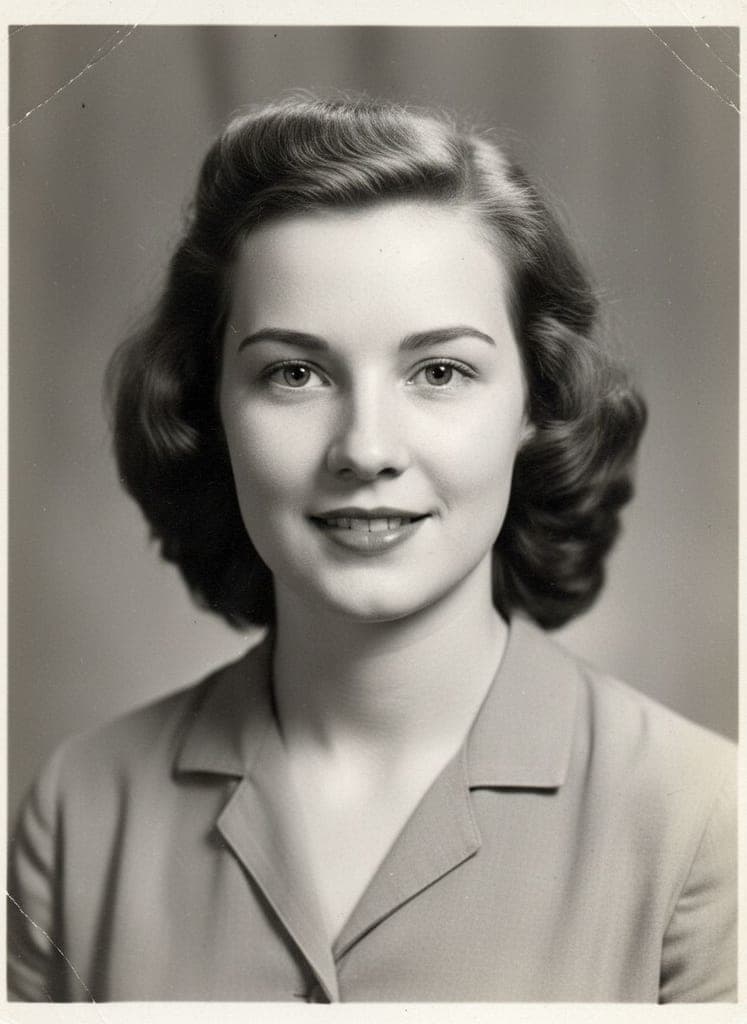
| Example | Real render from September 29, 2026. The sample photo is AI-generated, not a photo of a real person. |
| Page updated | November 9, 2026 |
Before and after
What the Old Photo, New Words example was made from
The example above is a real render of this template from this photo, made on September 29, 2026. The sample photo is AI-generated, not a photo of a real person.
What you need and what you get
- Photos (1 photo)
- Your photo — One clear, well-lit face looking roughly at the camera, with the whole mouth visible.
- Result
- A talking video of your photo, as long as the script. Made with TalkPix talking photo for the Old Photo, New Words template.
- Price
- Old Photo, New Words costs 1 credit per second at 720p; 2 credits per second at 1080p. Credit packs start at $5 with no subscription required, and credits never expire; see pricing.
The Old Photo, New Words script
Hello, my dear. This photo is older than you are, and look at us now, talking. I just wanted to say how proud I am of you. Keep laughing, keep being kind, and never forget where you came from.
Voice in the example: Aoede. Every word can be edited in the studio.
How do I make a talking old photo that speaks a message to my family?
Step 1
Open the Old Photo, New Words template
Old Photo, New Words opens in the Talking Photo studio with its script, speaking style and expression already loaded.
Step 2
Add 1 photo
Upload your photo for the Old Photo, New Words template.
Step 3
Generate
Sign in and check the displayed credit estimate (1 credit per second at 720p; 2 credits per second at 1080p) before generating. Paid generation needs sufficient credits; buy a pack if needed. A failed render returns its generation credits. Any optional image preparation has its own displayed charge.
Step 4
Download and post
The finished Old Photo, New Words video opens on its result page as an MP4 you download, share by link or run again with another photo.
Talking Old Photo Message questions
What is the Talking Old Photo Message template?
Talking Old Photo Message is the Old Photo, New Words Talking Photo template on TalkPix. Make a talking old photo: add one old family portrait and it speaks a gentle message to family. You add 1 photo and the result is a talking video of your photo, as long as the script.
How do I make a talking old photo that speaks a message to my family?
Open the Old Photo, New Words template (the Use this template button on this page, or talkpix.ai/create?trend=old-photo-message), add your photo, and press Generate. The Old Photo, New Words video is ready on its result page as a downloadable MP4; you can leave the page while it renders.
How much does the Old Photo, New Words template cost?
Old Photo, New Words is billed by the length of the finished video: 1 credit per second at 720p or 2 at 1080p. The button shows an estimate; the final charge uses the finished duration rounded up to a whole second. A 15-second Old Photo, New Words video at 720p uses 15 credits, equivalent to about $1.50 of the Mini pack. You buy credits in packs, not per video. Talking Photo supports typed text, uploaded audio, and recordings up to 5 minutes at 720p or 2 minutes at 1080p. Reusable credit packs start at $5 and credits never expire. Payment is required before any generation runs.
What photos do I need for Old Photo, New Words?
Old Photo, New Words needs 1 photo. Your photo: One clear, well-lit face looking roughly at the camera, with the whole mouth visible. Only use photos of yourself or of people who have agreed to it.
Will my Old Photo, New Words result match the example exactly?
No exact match is guaranteed. The example shows one real render, not a promise of identical output. AI can change faces, objects, motion or lettering. Use clear reference photos and review the downloaded result before posting.
Can I change what my photo says in Old Photo, New Words?
Yes. The template loads its script into the Talking Photo studio, and you can edit every word, change the voice or record your own before you generate.
Can I post Old Photo, New Words on TikTok, Instagram Reels or YouTube Shorts?
Yes. The Old Photo, New Words video keeps the framing of your photo: a vertical portrait suits TikTok, Instagram Reels and YouTube Shorts, a landscape photo suits YouTube and X. Download the file from the result page and post it from your own account; the result is AI-generated, so label it as such where a platform asks.
Do I need an app to make Old Photo, New Words?
No. Old Photo, New Words is made in the TalkPix web app, which runs in the browser on any phone, tablet or computer with nothing to install. You need a TalkPix account and credits; the exact cost is on the Generate button.
Is the Old Photo, New Words example real?
Yes. It is a real render of this template, made on September 29, 2026 from the sample photos shown on this page. The sample photo is AI-generated, not a photo of a real person.
Can I use my Old Photo, New Words video commercially?
Yes, when you hold the rights and consent for every photo you add and follow the TalkPix Terms and the rules of the platform you post on. Old Photo, New Words renders are AI-generated: only use photos of yourself or of people who have agreed to it.
Ideas
How to make old photos talk with a family message
This template is one ready script for an old portrait. For the full guide to old-photo speech, see make old photos talk.
Which old photos make the best talking portrait?
Pick a portrait where the face looks toward the camera and both eyes and the mouth are visible, like the creased black-and-white studio portrait in the sample. Scan a paper print flat, in even light, with no glare from glass or a plastic sleeve. Crop out other people so one face fills much of the frame. The black-and-white or sepia look stays as it is: the photo is not colorized or restored first.
Rewrite the grandparent's message in their words
The sample script has the portrait say it is older than you, that it is proud of you, and asks you to keep laughing, stay kind and remember where you came from. Swap in a nickname they used, the town they came from, or a saying the family still repeats. Keep the slow, warm tone, then pick an AI voice that suits them or upload a recording of your own.
A message from a departed loved one, shared gently
You might make this for a memorial, a family reunion or the anniversary of a grandparent's passing. The voice is an AI voice or your own recording, not the real person's, so say that when you share it, and ask close family before posting it publicly. For a longer piece with several photos, see the memorial tribute video guide.
Credit packs from $5 · no subscription required
More talking photo templates

Talking Birthday Card
Talking Photo

Personalized Santa Video Message
Talking Photo

Funny Breaking News Video
Talking Photo

Roast Myself Video
Talking Photo

Monday Motivation Video
Talking Photo

Talking Pet Dinner Complaint
Talking Photo
Same theme, other studios


Browse by theme
Make Talking Old Photo Message with your photo
Old Photo, New Words · Talking Photo studio · 1 photo · from 1 credit per second at 720p · A talking video of your photo, as long as the script